TL;DR
RepCard now integrates with HailTrace so your team can see storm zones, filter by hail size and wind speed, and assign territories based on real damage data — all without leaving the platform. Speed to door wins in storm restoration, and this integration eliminates the extra steps that slow teams down.
Storm Zones Are Now Inside RepCard
Here's what that means for your team.
Your reps have 24 to 48 hours after a storm event to get to the door before the competition does. That window is everything in storm restoration.
The problem? Most teams are checking HailTrace on their phones, then switching to their canvassing tool, then manually deciding where to send reps. By the time that process plays out, someone else has already knocked.
That changes today. RepCard now integrates directly with HailTrace.
Why Speed to Door Is the Only Metric That Matters After a Storm
Here's the reality of storm restoration sales: 78% of homeowners choose the first contractor who shows up after damage occurs. Not the cheapest. Not the one with the best reviews. The first one.
That stat should change how you think about every storm event. It's not about having the best pitch or the lowest price. It's about being there first.
The data backs this up across the board. Contractors who respond within 24 hours of a storm event see a 35% higher closing rate compared to those who wait. The first 24 to 48 hours are when homeowners are most motivated to act, because they're dealing with active leaks, visible damage, and the stress of filing an insurance claim (the average hail damage claim is roughly $9,000).
Every hour your team spends figuring out where to go is an hour a competitor is already knocking.
What the HailTrace Integration Actually Does
If you have a HailTrace subscription, you can now plug your API key into the RepCard desktop app. Once connected, your entire team gets access to storm zone data directly inside RepCard.
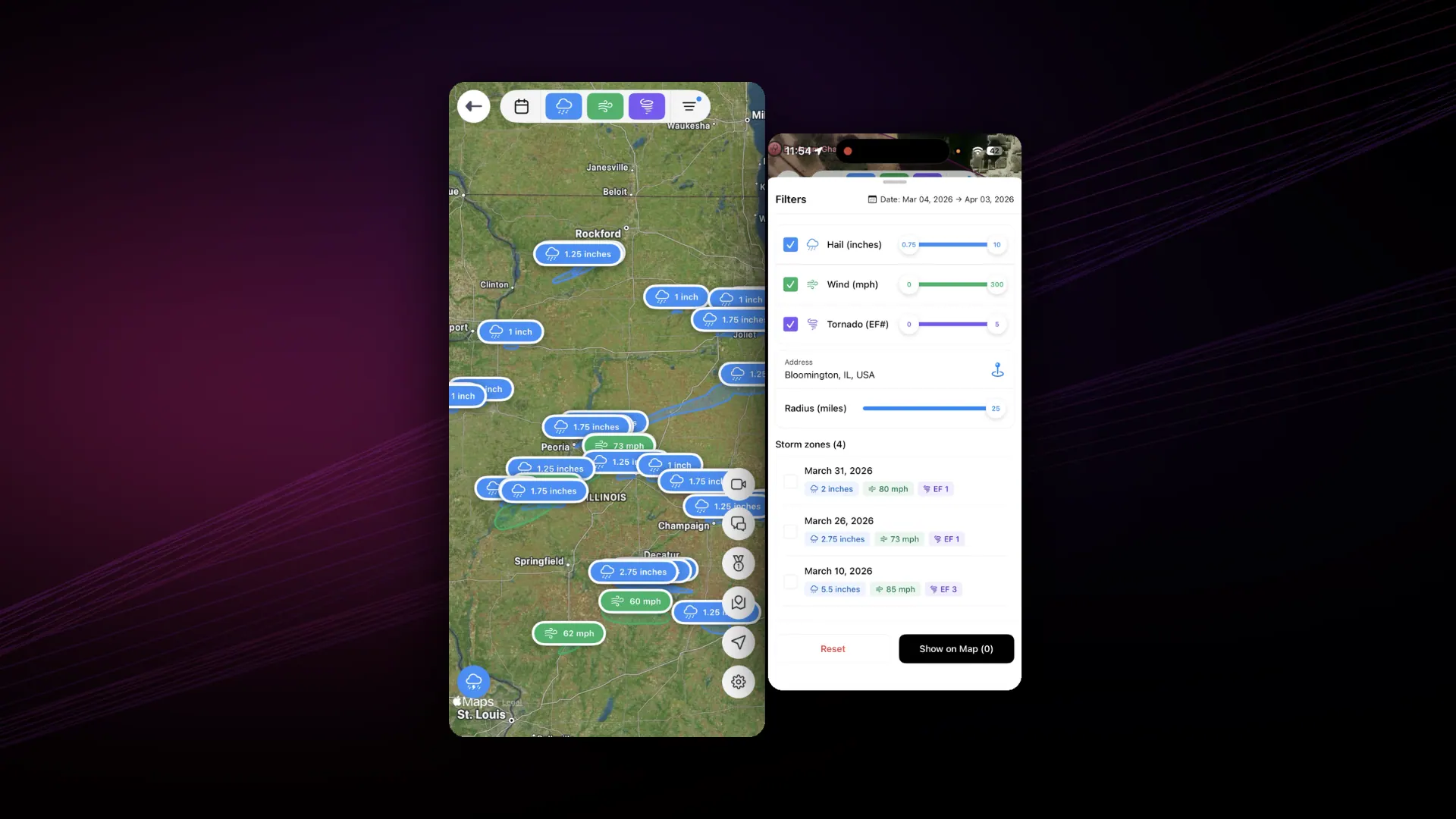
Here's what you can see and filter:
Storm Type Filtering
View zones affected by hail, wind, or tornado, or any combination. Focus your team on the damage types that match your services.
Hail Size Filtering
Filter storms by hail diameter. If you only chase 1-inch+ hail, filter out everything below that threshold so your reps aren't wasting time in areas with minor damage.
Wind Speed Filtering
Same concept for wind events. Set your minimum wind speed threshold and only see areas that hit it.
Storm Strength Filtering
Prioritize the most severe events and assign your best closers to the highest-value zones.
Territory Assignment
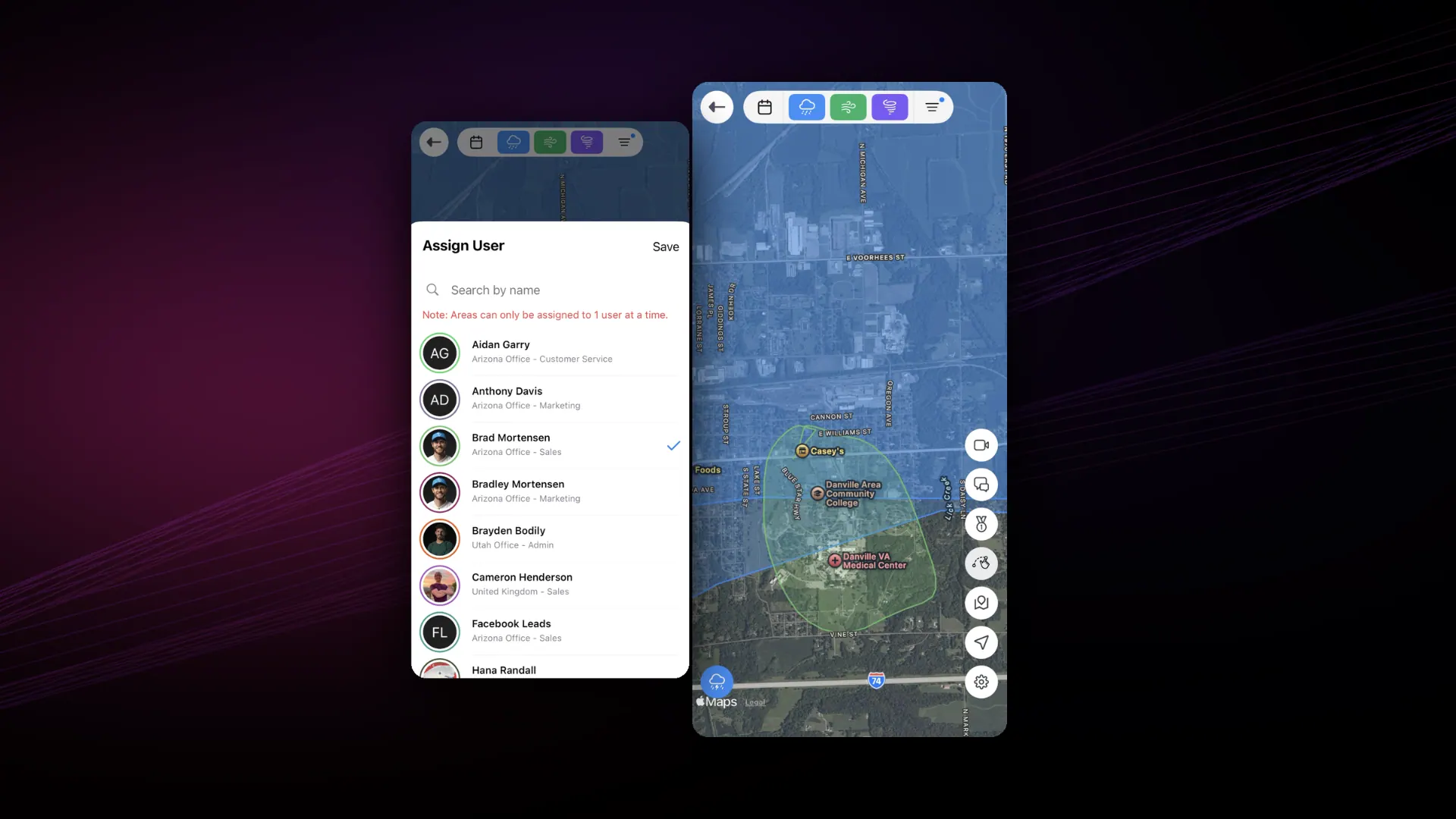
This is where it gets powerful. Instead of guessing where to send reps or relying on outdated data, you assign territories based on actual storm data. Your reps know exactly where to go and why. This ties directly into RepCard's canvassing and territory management tools.
How to Set It Up
The setup takes less than five minutes. No technical skills required.
- Log into the RepCard desktop app.
- Navigate to Settings > Integrations.
- Enter your HailTrace API key.
- Storm zone data populates across the platform.
That's it. Every rep on your team now has storm data in the same tool they use to plan routes, manage territories, and track leads. Zero extra apps. Zero manual data entry. Check out all of RepCard's integrations to see what else connects.
The Math on Why This Matters
Let's put some numbers behind this.
In 2024, over 12 million U.S. properties experienced hail damage. Insured losses from convective storms (wind and hail) hit $58 billion. The storm damage restoration market is at $50 billion globally and growing at 7% annually, projected to reach $85 billion by 2033.
That's a massive market. And 22% of all residential roofing replacements come from storm-related damage.
The companies winning in this market aren't the ones with the most reps. They're the ones who get to the door first with the right data. When you can see exactly where a storm hit, filter by severity, and assign reps to specific zones within minutes of the data dropping, you have a structural advantage over every competitor still checking a separate app and making phone calls to figure out where to send people.
Sources: Market Report Analytics, Sunsent State of Roofing 2025, Finturf Roofing Industry Trends 2025
Show Up with Proof, Not Just a Pitch
Speed to door wins the first conversation. But proof wins the deal.
HailTrace doesn't just show you where storms hit. It provides meteorologist-verified storm data backed by dual-pol radar analysis, ground-truth reports, and multi-layer accuracy checks from 15+ in-house meteorologists. This isn't generic weather data. It's "what actually happened on the ground" data.
That means your reps don't knock and say, "Hey, I noticed some hail damage in the area." They knock and say, "This property was in a verified hail zone with 1.5-inch stones on Tuesday night. Here's the data."
That's a different conversation. It builds credibility with the homeowner and supports date-of-loss conversations when the insurance claim gets filed. HailTrace customers have reported a 30% increase in sales from contacting leads right after storms (company-reported figure, not independently audited, but directionally consistent with the first-mover data above).
Wake Up Dead Leads When New Storms Hit
Here's an angle most teams miss entirely.
Every property your reps have visited, every "no damage found" inspection, every lead that went cold — those are all still in your system. When a new storm hits those same areas, those leads come back to life.
HailTrace's Impacted Assets feature lets you track properties you've already worked and see when they're hit by a new event. Combined with RepCard's follow-up engine, you can re-engage past customers and cold leads the moment new damage occurs.
Think about what that means. A homeowner who said "no thanks" six months ago because there was no visible damage just got hit by a hail event. Your rep already has the relationship. They already have the contact info in RepCard. Now they have a reason to go back.
HailTrace has reported that 25% of their customers' clients came back for a second job or repair in some cases. That's not net-new prospecting. That's revenue from relationships you've already built.
What This Looks Like in Practice
Scenario: A hail event hits the Dallas-Fort Worth metro at 2 AM.
Without the integration: Your manager wakes up, checks HailTrace on their phone, screenshots the affected areas, texts the team, and tries to coordinate who's going where. By mid-morning, your reps are heading out. So is everyone else's.
With the integration: Your manager opens RepCard, sees the affected zones already mapped, filters for 1-inch+ hail, and assigns territories to reps before the first cup of coffee. Your reps have their routes and are knocking by 8 AM while competitors are still figuring out their plan.
That's the difference between getting there first and getting there third.
Scenario: Multiple storm events across a region over a week.
Without the integration: It's chaos. Your team is juggling data from multiple storms, trying to figure out which areas are fresh and which have already been canvassed by competitors. Overlap everywhere.
With the integration: Each storm event shows up in RepCard with its own data layer. You filter, assign, and track coverage for each event independently. No overlap. No wasted knocks. Every rep is in the right zone at the right time.
The Competitive Edge No One Else Is Offering
No other sales operating system in the D2D space pulls HailTrace data natively. Your competitors' tools require reps to check storm data separately. That's an extra step. Extra steps mean slower response. Slower response means lost deals.
RepCard eliminates that gap. HailTrace finds the storm. RepCard runs the response. Storm data, territory assignment, route planning, lead tracking — all in one platform. That's what a Sales Operating System does.
Get Started
If you're already on RepCard and have a HailTrace subscription, you can set this up right now in the desktop app. Takes less than five minutes.
If you're not on RepCard yet, this is a good reason to look at what a real Sales Operating System can do for your storm restoration team.
Contact Sales to see the HailTrace integration in action.
Key Takeaways
- 1RepCard now integrates directly with HailTrace — storm zone data lives inside your sales platform.
- 278% of homeowners choose the first contractor who shows up after storm damage, making speed to door the most important metric.
- 3Filter storm data by type, hail size, wind speed, and strength to focus reps on the highest-value zones.
- 4Assign territories based on real damage data instead of guessing where to send your team.
- 5HailTrace provides meteorologist-verified data — reps show up with proof, not just a pitch.
- 6Re-engage dead leads when new storms hit areas you've already canvassed using HailTrace's Impacted Assets feature.
- 7Setup takes under five minutes — just enter your HailTrace API key in the RepCard desktop app.
- 8No other D2D sales operating system pulls HailTrace data natively, giving RepCard users a structural advantage.
Frequently Asked Questions
Yes. You need an active HailTrace subscription and API key. Once you have that, you can connect it to RepCard in under five minutes through Settings > Integrations in the desktop app.
You can filter by storm type (hail, wind, tornado), hail size diameter, wind speed thresholds, and overall storm strength. This lets you focus your team on the zones that match your services and severity requirements.
The HailTrace integration is set up through the RepCard desktop app. Once configured, storm zone data is available across the platform for territory assignment and route planning.
Yes. That's one of the most powerful features. Instead of guessing where to send reps, you can assign territories based on actual storm data — zone by zone — so every rep knows exactly where to go and why.
Research shows 78% of homeowners choose the first contractor who shows up after damage. Contractors who respond within 24 hours see a 35% higher closing rate. Every hour spent planning is an hour competitors are already knocking.
Related RepCard Features
Related Articles

The Four Pillars of a Sales Operating System
A Sales Operating System unifies recruiting, training, selling, and marketing for field sales teams. See why fragmented tool stacks cost you reps.
Read more
Own Your Turf: D2D Canvassing Playbook
Territory management separates amateur door-knockers from professional canvassers. Learn the systems that maximize coverage and minimize wasted effort.
Read more
10 Ways to Improve Door-to-Door Canvassing
Boost your canvassing efficiency with these 10 proven strategies. Work smarter, knock more doors, and close more deals.
Read more