
TL;DR
The new Lasso Tool turns RepCard's canvassing map into a bulk territory and contact management surface. Draw any area, see contacts grouped by status, and reassign the territory and owners in one action from your phone.
If you manage a field sales team, you already know the drill. A rep leaves. Territories shift. Contacts need to move to new owners.
Today, those changes are easy.
The new Lasso Tool in RepCard turns the canvassing map into a full territory management surface. Draw any shape, see what's inside, and update ownership in bulk. No more one by one lead updates. Manage territories and leads at scale in seconds.
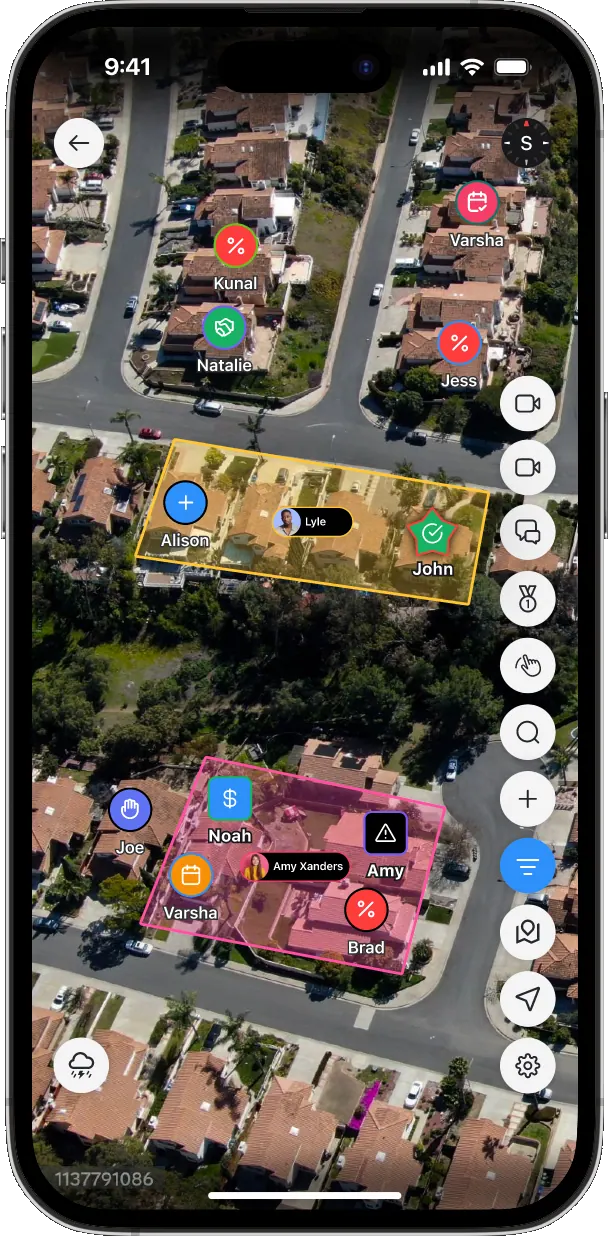
Step 1: Draw any area on the map
Open the canvassing map in the app, select the lasso tool, and draw a shape around the pins you want. You can also tap an existing area to open the assignment options.
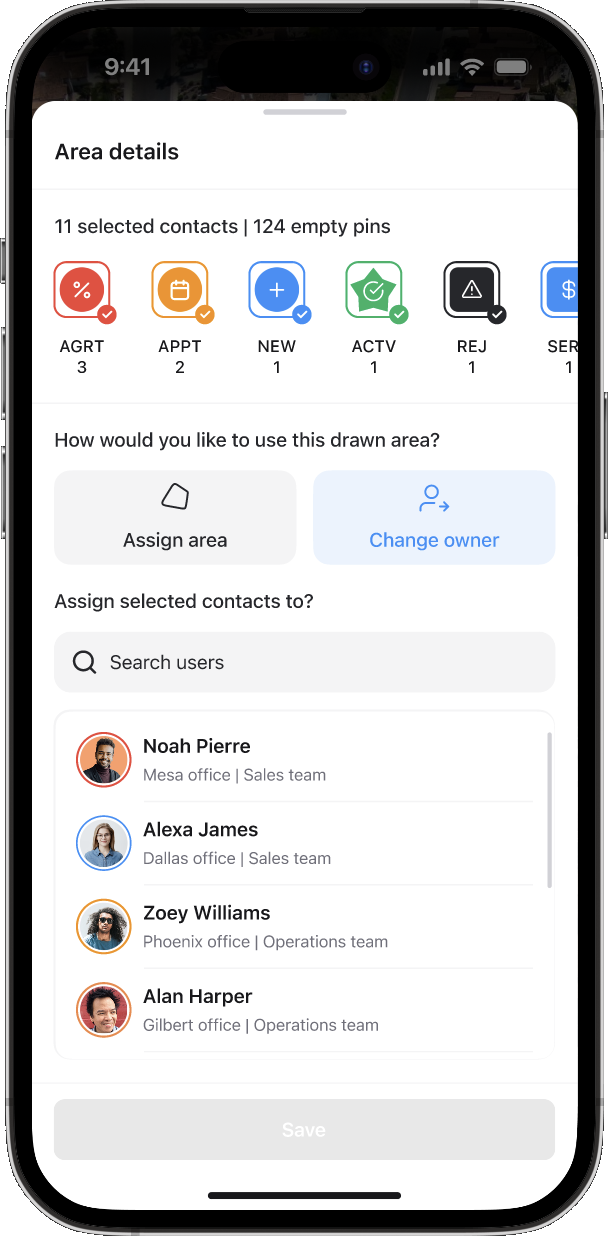
Step 2: Select the contact statuses you want
Every contact inside the area shows with its associated status. Tap a status chip to select or deselect every contact with that status. The next step only affects the selected statuses.
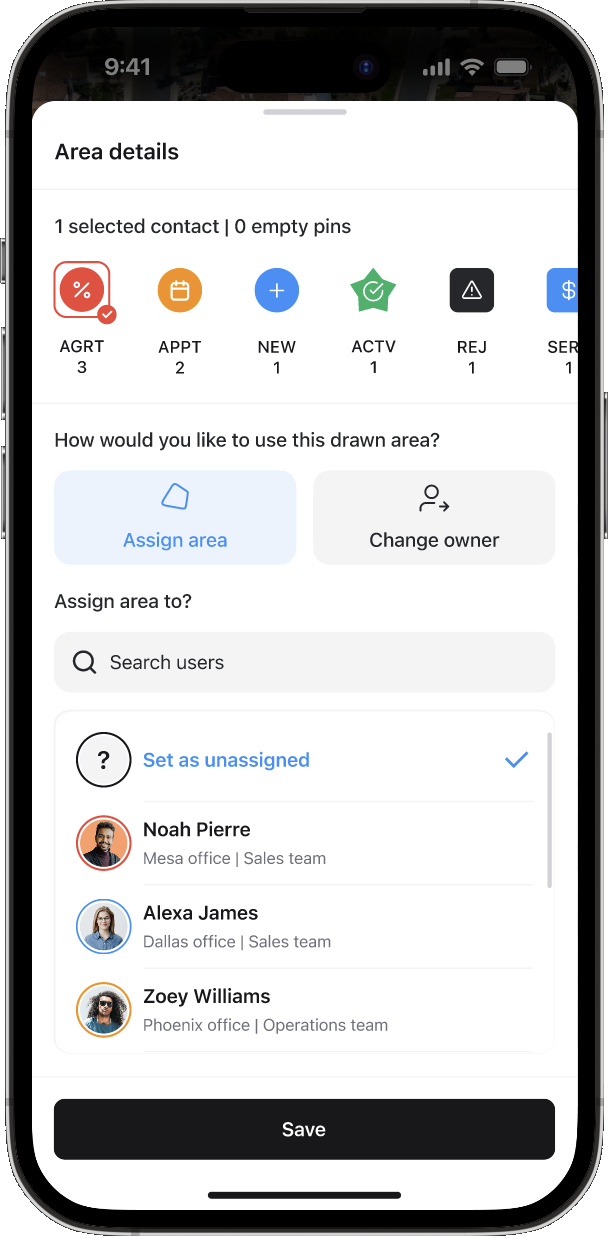
Step 3a: Assign the area
Assign the area to a specific person, or set it as unassigned. Setting it as unassigned is great for territory planning, when you've mapped out the zone but haven't picked the rep yet.
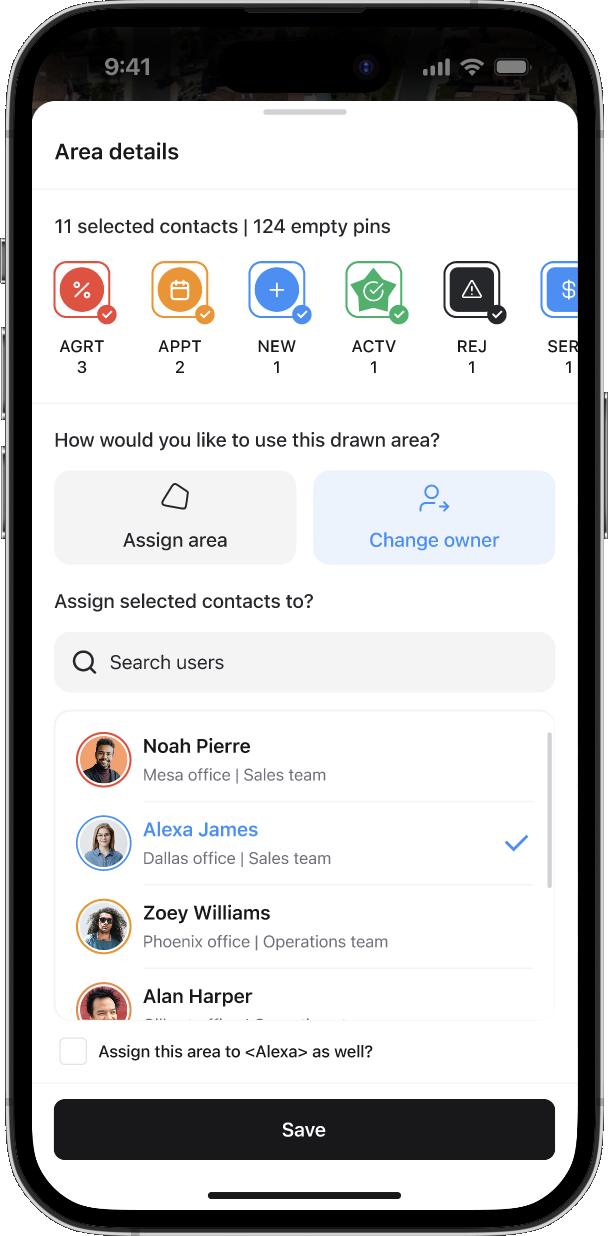
Step 3b: Or change contact owner
Pick "Change Owner" to bulk-reassign every selected contact to a new rep in one save.
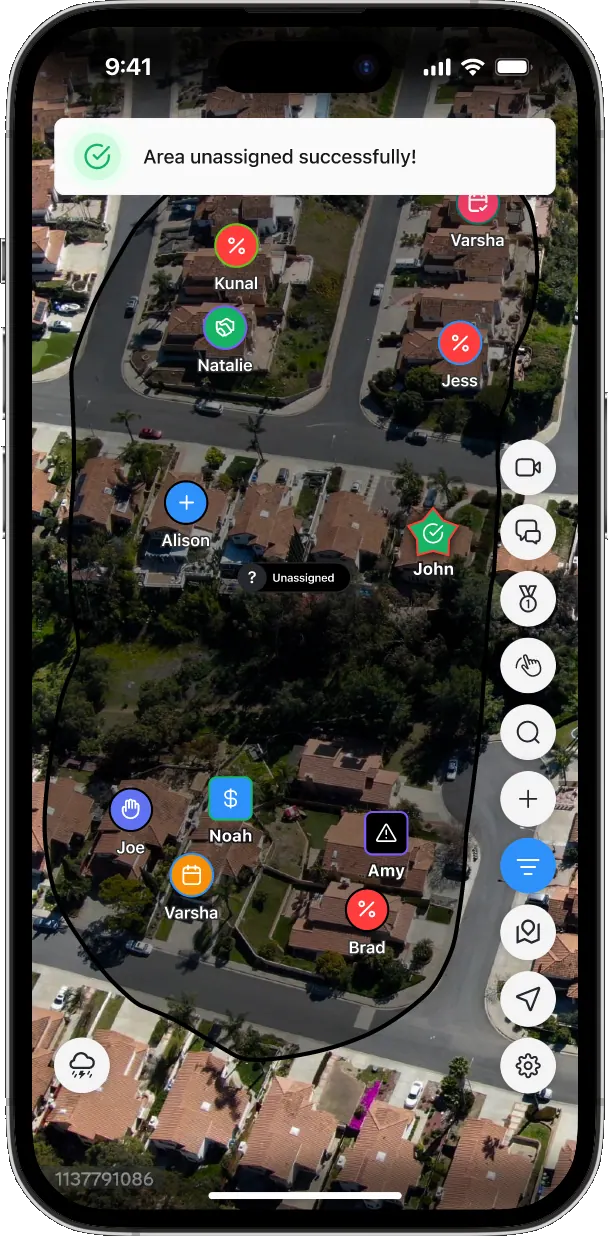
Step 4: Done
It's as easy as that. Just a few steps on your phone, and you can make area and contact ownership adjustments for your team.
What the Lasso Tool actually does
Three things, all from inside the rep app on iOS or Android.
Draw or open any area on the canvassing map. The lasso interaction is the same draw motion you already know. Tap an existing area to open it instead, same drawer, same actions.
See every contact inside, grouped by status. The mini drawer loads instantly with a full breakdown: total selected contacts, empty pin count, and contact counts by status. You stop assigning blind.
Bulk-update ownership. Filter by status to scope what you want to act on. Then assign or reassign the area to a user, and bulk-update the contact owner for every selected contact in one action.
That's it. Just a few seconds.
Why we built this
The canvassing map already let managers draw and assign areas. What it didn't do: tell you what was inside that area, or let you do anything to those contacts in bulk.
So managers had two bad options. Assign a territory to a rep without knowing what contacts were actually in it. Or update contact owners one at a time, usually inside the Admin Panel on a laptop.
That gap turned simple territory changes into 30-minute operations. Worse, it pushed the work out of the field and back into the office, which is exactly where field sales managers don't want to spend their day.
The Lasso Tool closes that gap. Visibility and bulk action, on the device managers already have in their hand.
What changed in the workflow
Before: Draw area, assign user, hope for the best. Open the Admin Panel on a laptop to fix contact ownership. Update each contact's owner one by one. 20 to 30 minutes for a single territory shift.
After: Draw the area on your phone. See the contacts inside, grouped by status. Filter to the statuses that matter. Assign the territory and bulk-reassign owners in one action. Under 60 seconds for the same shift.
The win isn't just speed. It's where the work happens. Territory management moves out of the back office and onto the same map your reps are working all day.
Two use cases where this shows up fast
A rep leaves and you need to redistribute their book. Open the rep's existing area on the map. Filter to "Open" and "Follow-up" statuses. Reassign the area and the contacts to the new owner. Done before lunch.
You're splitting an oversized territory. Draw a sub-section of a larger zone. The drawer shows you exactly how many contacts and pins land in the new area, by status. Reassign just that slice to a junior rep. Original territory stays intact.
Both of these used to be Admin Panel jobs. Now they're map jobs.
What's locked, what's not
A few things to know before you roll this out to your team.
- FieldRoutes contacts stay locked. If you have FieldRoutes integrated, those contacts cannot be reassigned through the Lasso Tool. The integration owns them. The drawer flags this clearly so reps don't get confused.
- Permissions matter. Three permissions control who can use what: Assign Area, Change Contact Owner, and Delete Area. Set them up before you announce internally.
- Area shapes can't be edited after creation. If you need to change the shape, delete the area and redraw. The bulk action still works the same on the new area.
- Overlapping areas don't auto-resolve. Manager judgment call, same as before. If two areas overlap, the lasso shows you the contacts inside the area you're acting on. Plan your zones with that in mind.
Who should be using this
Sales managers and admins running field or door-to-door teams who use canvassing to manage territories. If you've ever opened the Admin Panel to reassign contacts, this is for you.
Operations leaders and team leads responsible for territory accuracy and rep accountability. The visibility into contacts-by-status inside any drawn area is a planning tool, not just a maintenance tool.
If your team doesn't use the canvassing map, this won't move the needle for you. The Lasso Tool requires the canvassing feature, available on Enterprise plans.
How to get started
Open the canvassing map in the RepCard app. Draw any area, or tap an existing one. Watch the drawer load with the contact breakdown. Pick "Assign Area" or "Change Owner" depending on what you're doing. Choose the user, save.
That's the full workflow. No new training program needed for reps. Permissions and roles work the way they already do in your account.
For step-by-step instructions and answers to the most common questions (locked contacts, permissions, overlapping areas), see the help center article on the Lasso Tool.
What this unlocks next
The Lasso Tool is the first time RepCard treats a drawn area as something you can act on in bulk, not just assign. The same pattern (draw, see, act) opens the door to other mass updates inside canvassing in future releases.
If your team is bouncing between the rep app and the Admin Panel to manage territories today, this is the release that ends that.
See it in your account
The Lasso Tool is live now for all Enterprise customers using canvassing. No setup, no migration, no toggle. Open the app and draw.
If you're not on Enterprise yet, or you want to see how the full canvassing workflow fits with your team's setup, book a demo and we'll walk you through it on your map, with your data.
Key Takeaways
- 1Draw any area on the canvassing map and see every contact inside, grouped by status.
- 2Bulk-reassign the territory and contact owners in one save, from iOS or Android.
- 3Cuts a typical 20 to 30 minute territory shift down to under 60 seconds.
- 4Three permissions (Assign Area, Change Contact Owner, Delete Area) control rollout.
- 5FieldRoutes-integrated contacts stay locked, and area shapes can't be edited after creation.
Frequently Asked Questions
No. FieldRoutes-integrated contacts stay locked because the integration owns them. The drawer flags this clearly so reps know which contacts the bulk action will skip.
Three permissions control access: Assign Area, Change Contact Owner, and Delete Area. Set them up in Roles & Permissions before rolling the feature out internally.
No. To change the shape, delete the existing area and draw a new one. The bulk update flow works the same on the new area.
The Lasso Tool requires the canvassing feature, which is available on Enterprise plans. It's live now with no setup or migration required.
Related RepCard Features
Related Articles

The Four Pillars of a Sales Operating System
A Sales Operating System unifies recruiting, training, selling, and marketing for field sales teams. See why fragmented tool stacks cost you reps.
Read more
Own Your Turf: D2D Canvassing Playbook
Territory management separates amateur door-knockers from professional canvassers. Learn the systems that maximize coverage and minimize wasted effort.
Read more
How to Bulk Import Leads in RepCard's New Import Flow (2026)
Bulk import leads into RepCard with the new flow. Map columns, assign owners, handle duplicates, and route leads to subcompanies in one workflow.
Read more